
Agentforce for Microsoft Teams: AI Agents Where Work Actually Happens
Sales and service teams spend their day inside Microsoft Teams — not inside Salesforce.
That’s why Salesforce Agentforce is so powerful… but only if agents can show up inside the collaboration layer where conversations, meetings, and decisions happen in real time.
Centro’s Agentforce for Microsoft Teams makes that possible.
With Centro, you can interact with Salesforce AI agents directly in Teams chats, channels, shared channels, and even on mobile — while keeping Salesforce records continuously updated in the background.
This post walks through:
- The key usability features of Agentforce inside Teams
- The most valuable agent actions available today
- Real sales and service use cases
What Makes Agentforce in Teams Actually Usable?
Most AI tools fail because they require people to leave their workflow.
Centro brings Agentforce into Teams in a way that feels native, conversational, and immediately actionable.
Employee Agents Inside Teams
Centro supports employee-facing agents that live directly inside Microsoft Teams. Those can take advantage of the Agentforce User License type!
These agents can help employees:
- Retrieve Salesforce context instantly
- Answer internal questions
- Summarize activity
- Take action across Sales and Service workflows
Instead of logging into Salesforce, users can simply ask the agent from Teams.
@Mentionable Agents in Channels
In addition to direct chat-based agents, Centro enables agents that can be @mentioned inside Teams channels, just like a teammate.
Example:
“@SalesAgent summarize open opportunities for this account.”
This unlocks collaborative workflows where AI agents participate directly in team discussions.
Benefits include:
- Shared visibility
- Faster alignment
- Reduced swivel-chair between Salesforce and Teams
Agent Actions That Go Beyond Q&A
Agentforce becomes truly powerful when it can do things, not just respond.
Centro supports Agent Actions inside Teams that allow agents to:
Create Teams Chats or Channels Automatically
Agents can spin up a new chat or channel tied to a customer, opportunity, or case.
Summarize Channels and Conversations
Agents can read conversation history and generate summaries instantly.
Understand Salesforce Record Context From Teams
Agents can answer questions like:
- “What’s the latest status on this opportunity?”
- “Who owns this account?”
- “What cases are open for this customer?”
Send Messages to the Right Team at the Right Time
Agents can proactively notify teams based on Salesforce events or service escalations.
This is where AI becomes operational — not theoretical.
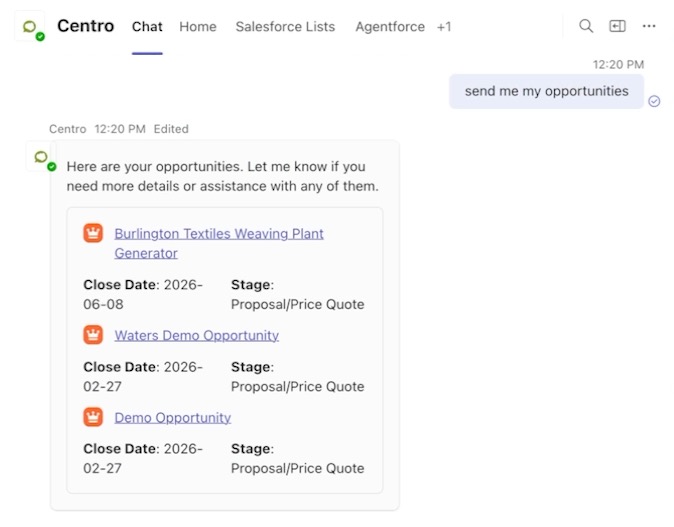
Lightning Cards: Rich Salesforce Responses in Teams
Plain-text AI responses aren’t enough for enterprise workflows.
Centro leverages the Lightning Card framework so agents can return rich, structured responses directly inside Teams, including:
- Opportunity detail cards
- Case status cards
- Quote previews
- Interactive record actions
- Salesforce links and context
This gives Teams users the same richness they’d expect inside Salesforce — without leaving Teams.
Real Agentforce Use Cases Inside Microsoft Teams
Now that we’ve covered usability, let’s look at the real-world scenarios driving adoption.
These are high-intent use cases that map directly to search traffic and buyer interest.
Meeting Intelligence: Summarize Teams Recordings + Drive Next Steps
Teams meetings produce enormous amounts of data — but most of it never makes it back into Salesforce.
Centro enables workflows like:
- Record a Teams customer call
- Agent summarizes the discussion
- Agent identifies next steps
- Salesforce is updated with notes, tasks, and follow-ups
This closes the gap between conversation and CRM.
Service: Answer Questions + Create Cases in Teams Shared Channels
Support increasingly happens in Teams — especially in shared channels with customers or partners.
With Centro:
- Agents can answer service questions instantly
- Cases can be created from Teams
- Case updates can be posted back into the channel
- Teams becomes a true service workspace
This is especially powerful for Slack Connect-style service workflows, now available in Teams.
Revenue Cloud: Quoting Agents That Build Customer Quotes
Quoting is often slow because it requires navigating CPQ or Revenue Cloud interfaces.
In Teams, a rep can ask:
- “Create a quote for Edge Amex.”
- “Add 5 headset units.”
- “Show me the quote summary.”
Agentforce handles the quoting workflow while the rep stays in Teams.
Knowledge Agents: Field Answers Without Searching Portals
Field teams don’t want to dig through Salesforce Knowledge or SharePoint.
Centro knowledge agents can answer:
- “What’s the install procedure for Product X?”
- “What’s our return policy for this customer?”
- “Has this issue happened before?”
Right inside Teams — on desktop or mobile.
Why Centro for Agentforce in Teams?
Centro delivers Agentforce inside Teams in an enterprise-ready way:
✅ Employee and @mentionable agents
✅ Native Teams chat + channel experience
✅ Lightning card UI for rich Salesforce context
✅ Actions that update Salesforce and Teams automatically
✅ Works across Sales Cloud, Service Cloud, Revenue Cloud, and Knowledge
✅ Secure and configurable for real deployments
Ready to See Agentforce in Teams in Action?
Agentforce shouldn’t live only inside Salesforce.
With Centro, AI agents become part of where work actually happens: Microsoft Teams.
If you want to see these use cases live, check out the videos embedded above — or reach out for a demo.

