For revenue operations teams

Run your Salesforce pipeline from Microsoft Teams and Slack

Reps update deals, get alerts, and ask questions about their pipeline in the chat they already use. Every change lands in Salesforce, and your data stays clean.

SOC 2 Type II
Audited annually by A-LIGN
No shadow data store
Records stay in your Salesforce org
5.0 on AppExchange
Across 44 reviews

Trusted by revenue teams at

Customer logo 1Customer logo 2Customer logo 3Customer logo 4Customer logo 5Customer logo 6

Prompt the rep, not the AI

Most AI tools wait for a rep to ask the right question. Centro messages the rep first when a deal needs attention, with the record and the next step in the message. Reps act in one click, and Salesforce stays current.

Checkout CentroBot

Action Prompts for every deal

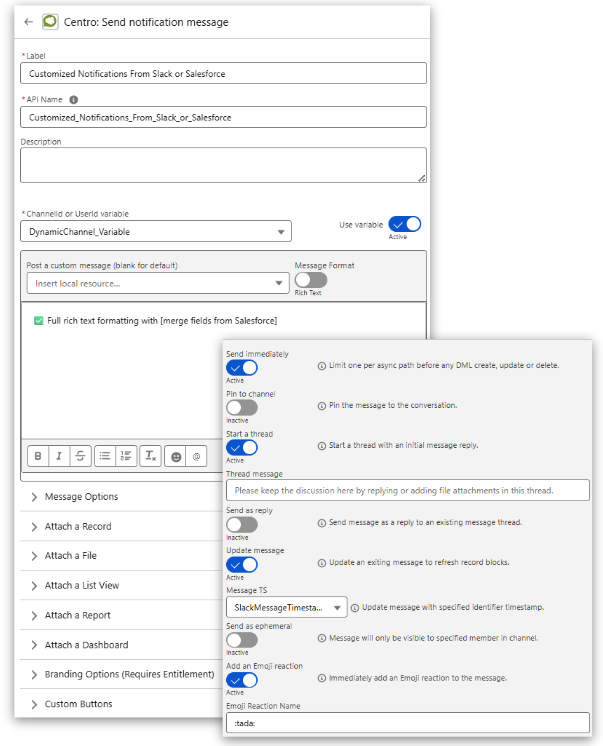
  • Salesforce Flow messages the rep when a deal stalls or a close date slips.
  • It also messages the rep when a required field is missing.
  • The rep updates the record from the message.
Centro Send notification message action in Salesforce Flow Builder, configured with a dynamic channel variable, a rich-text message with Salesforce merge fields, and options to pin, thread, and update the message.

Update opportunities without opening Salesforce

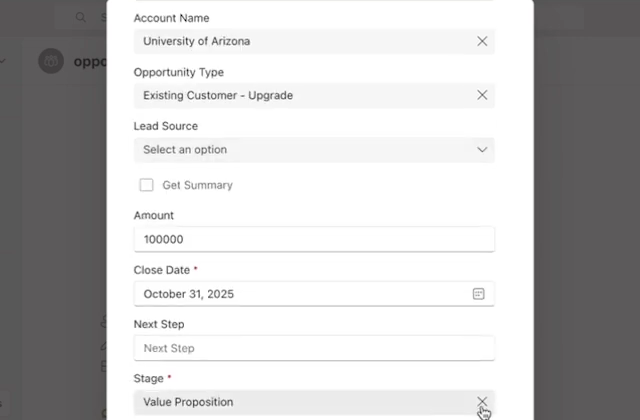
  • Reps edit stage, amount, and close date from a record card in Teams or Slack.
  • Salesforce validation rules still apply.
  • Salesforce permissions still apply.
Centro Edit Opportunity form open in Microsoft Teams, with account name, opportunity type, amount, close date, next step, and stage fields.

Deal desk approvals in chat

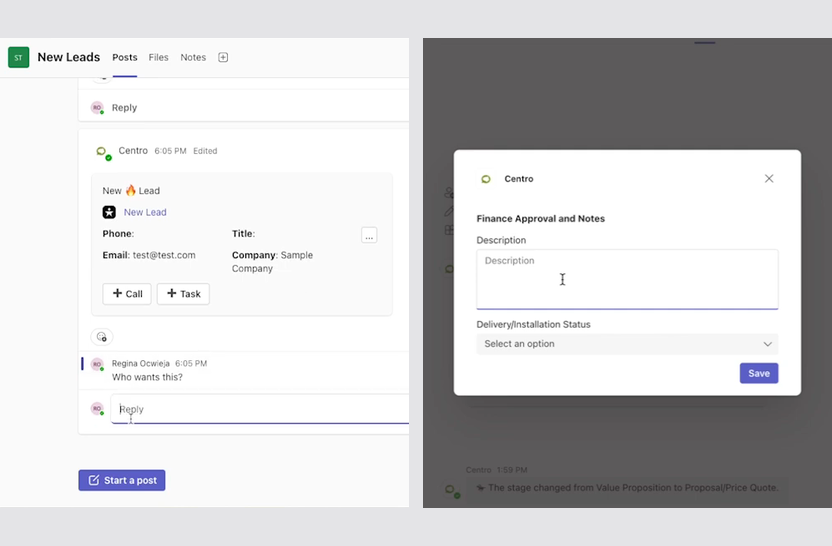
  • Discounts, legal review, and finance review go to the approver in Teams or Slack.
  • They respond from the message.
  • The decision is recorded in Salesforce.
Centro Deal Desk Request card in a Microsoft Teams channel showing amount, account, owner, and close date, with a stage picker and Call, Task, Quick Edit, Legal Review, and Finance Review buttons.

Alerts your team acts on

  • New leads, closed-won deals, and renewals post to the right channel or person.
  • Each alert has buttons to call or create a task.
  • Reps can also open the record from the alert.
Centro new lead alert in a Microsoft Teams channel with phone, email, title, and company fields and Call and Task buttons.

For the whole deal team

Bring in people without Salesforce licenses

Sales engineers, finance, legal, and executives weigh in on deals without a Salesforce seat. Each deal can get its own channel, with the record card in the chat and updates posted as they happen.

A channel per deal

Open a deal room automatically when an opportunity reaches a stage you choose.

Individual attribution

Every update and approval is logged to the person who made it, not a shared integration user.

Salesforce permissions apply

People see only what your Salesforce configuration allows.
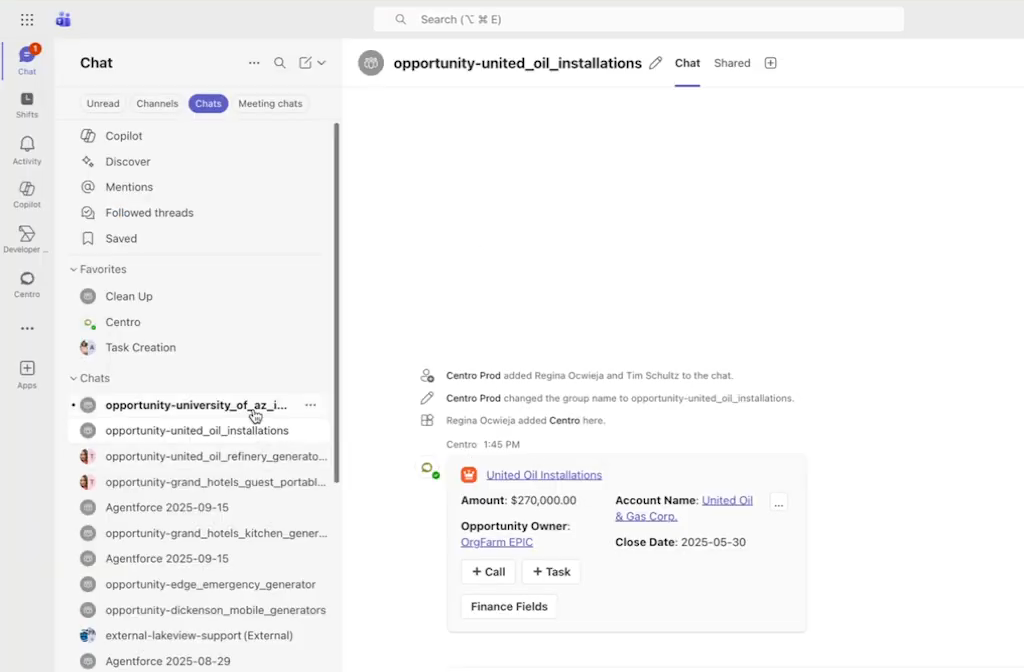
Microsoft Teams chat list with a chat for each Salesforce opportunity, open to a deal chat where Centro posted the opportunity card with amount, account, owner, close date, and Call and Task buttons.

A deal room in Microsoft Teams with the opportunity card posted.
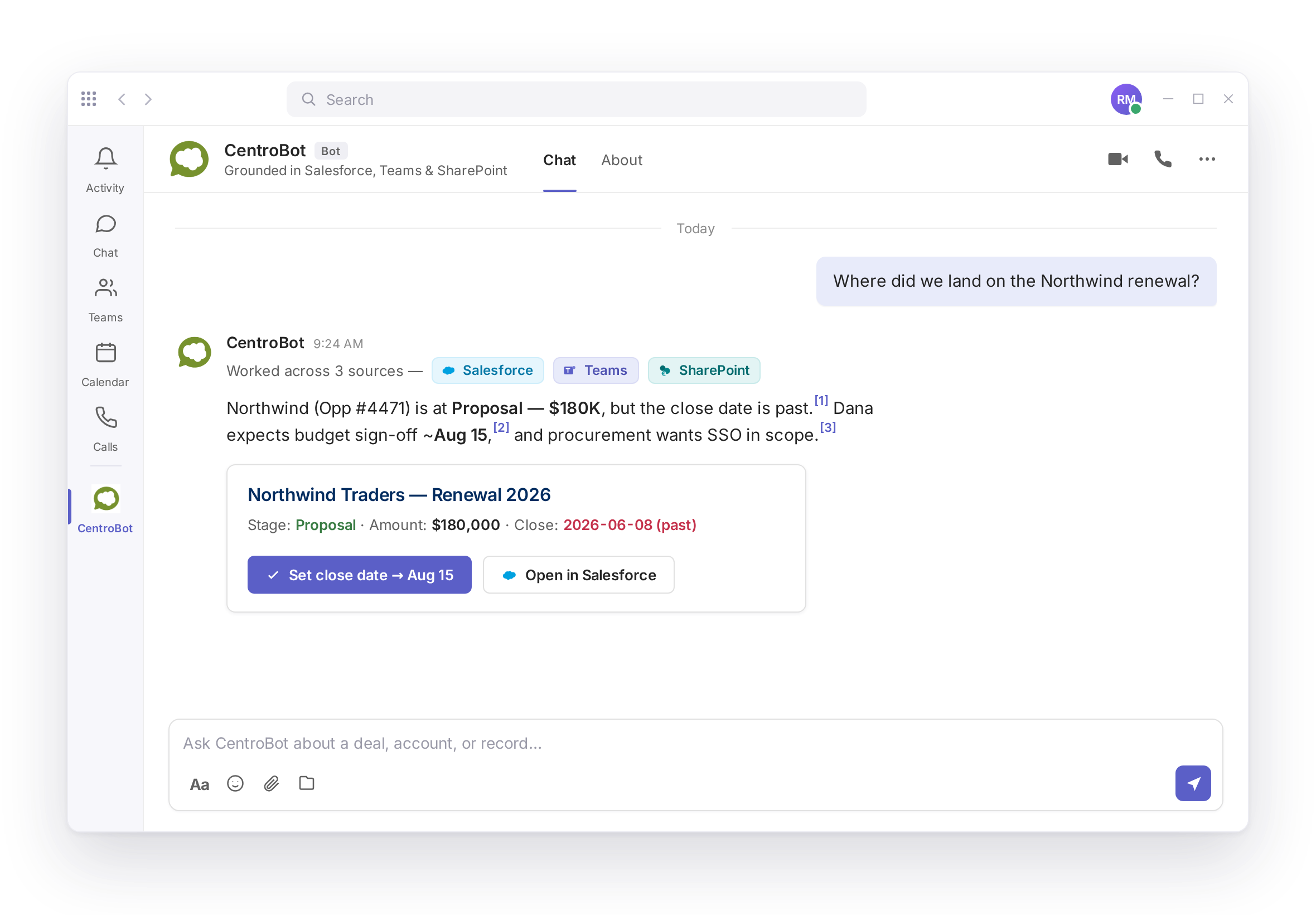
Answers about your pipeline, with sources

  • Reps ask CentroBot about their deals, accounts, and renewals, and get answers from Salesforce, SharePoint, Teams, and Outlook with a citation on every answer.
  • Every create or update asks for approval before it writes.
  • CentroBot is available to users with a Salesforce license.
CentroBot in Microsoft Teams answering a question about the Northwind renewal with citations to Salesforce, Teams, and SharePoint, plus a renewal card with buttons to set the close date or open the record in Salesforce.

Built for Salesforce admins

  • Configured in Salesforce with Flow
  • Different fields per record type
  • Validation rules and permissions always apply
  • Teams and Slack users collaborate without a Salesforce license
  • Installs from AppExchange and Microsoft Marketplace
SOC 2 Type II, audited annually by A-LIGN. No shadow data store.
Security details

Frequently asked questions

Can reps update Salesforce opportunities from Microsoft Teams?

Yes. Reps edit stage, amount, and close date from a record card in Teams. Validation rules and permissions still apply.

Yes. The same record cards work in Slack. Every change lands in Salesforce.

Yes. Sales engineers, finance, legal, and executives take part in Teams or Slack without a Salesforce seat. Their updates and approvals are logged to them individually.

No. Every create or update asks for approval before it writes.

No. Centro keeps no shadow data store. Records stay in your Salesforce org.

Plans and prices are listed on the pricing page.

See it on your own pipeline