For customer service teams

Work Salesforce Cases from Microsoft Teams and Slack

Create, update, and resolve Cases in the conversation where the question was asked. No Apex, no Block Kit, and Teams users don't need a Salesforce license to take part.

SOC 2 Type II
Audited annually by A-LIGN
No shadow data store
Records stay in your Salesforce org
5.0 on AppExchange
Across 44 reviews

Trusted by service teams at

Customer logo 1Customer logo 2Customer logo 3Customer logo 4Customer logo 5Customer logo 6

Where the native integration stops

Out-of-the-box Teams and Slack integrations handle one-time actions, like posting a message or creating a channel. Service teams need the repeatable version: every Case gets its conversation, status changes post back automatically, and the resolution lands on the record. Centro is that build, productized.

See the full comparison

Create Cases from any message

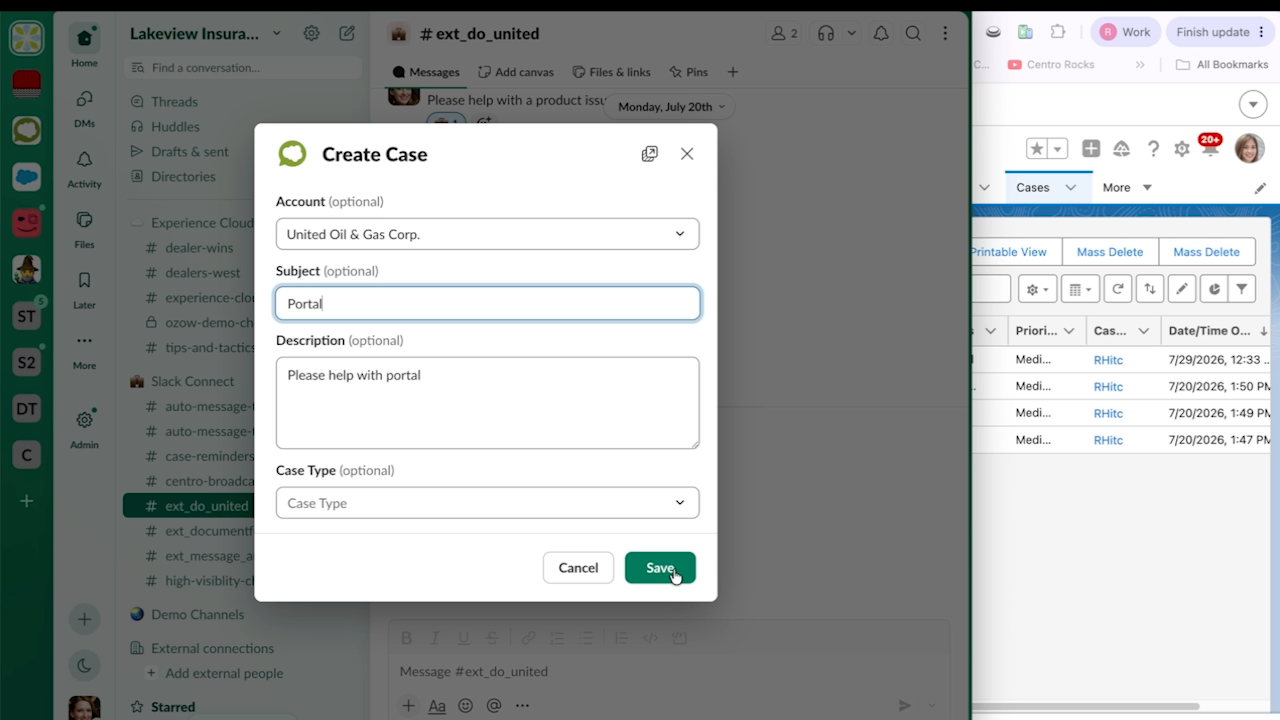
  • Turn a Teams or Slack message into a Case.
  • Use a shortcut or a Centro Form.
  • Files and context carry over.
Centro Create Case form in a Slack Connect channel, filled in with the account, subject, and description for a new Salesforce Case, beside a Salesforce Cases list.

Every Case gets a linked conversation

  • Open a channel or chat per Case automatically.
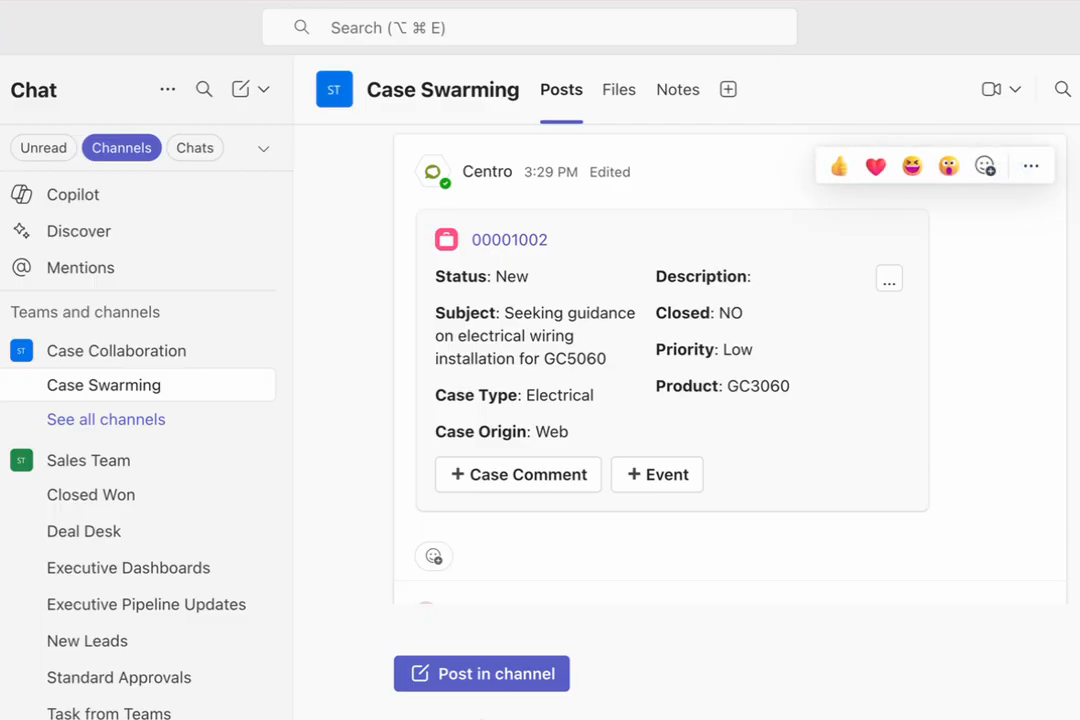
  • A live record card shows status, owner, and priority.
  • Agents update fields without leaving chat.
Centro record card for a Salesforce Case in a Microsoft Teams channel, showing status, subject, priority, and case type with Case Comment and Event buttons.

Two-way automation with Salesforce Flow

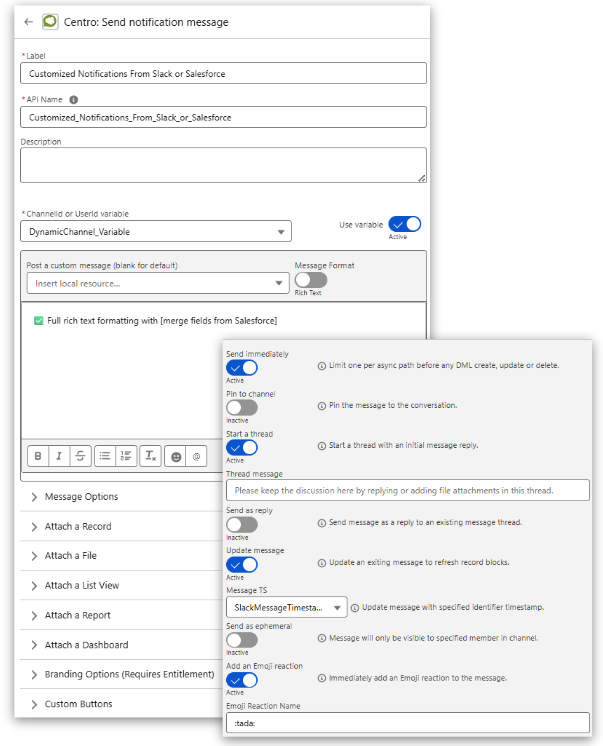
  • Escalations, SLA warnings, and status changes post to the right conversation.
  • Replies log back to the Case.
  • Meeting summaries log back to the Case.
Centro Send notification message action in Salesforce Flow Builder, configured with a dynamic channel, a rich-text message with Salesforce merge fields, and options to start a thread, update the message, and add an emoji reaction.

Broadcast incident updates

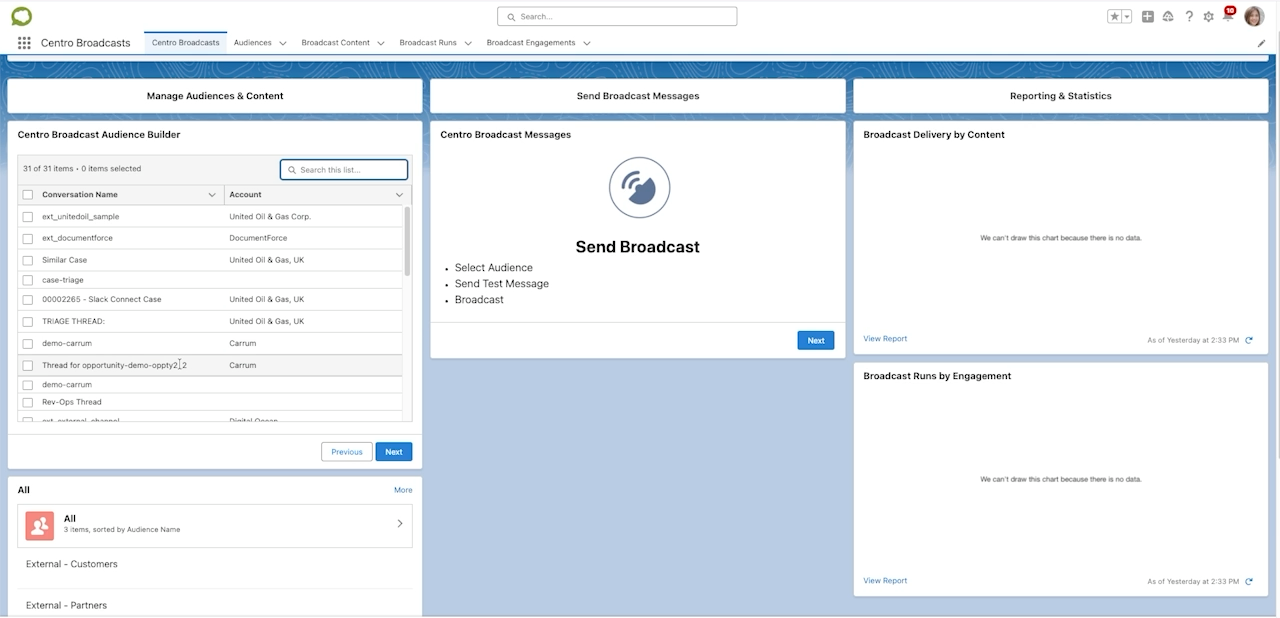
  • Send one update to hundreds of customer channels at once.
  • Compose and send it from Salesforce.
  • Customers read it in the channel where they already talk to you.
Centro Broadcasts app in Salesforce, with an audience builder listing customer conversations by account, a Send Broadcast panel, and broadcast delivery and engagement reports.

For external support

Support customers in Slack Connect and shared channels

Your customers already message you in Slack Connect and Microsoft Teams shared channels. Centro turns those conversations into Salesforce Cases without moving anyone to a portal or a separate ticketing tool. The Case lives in Service Cloud, with your routing, SLAs, and reporting.

One channel per customer account

Link each shared channel to its Salesforce Account. Every Case raised there is tied to the right customer automatically.

Case updates post back to the customer

Status changes, escalations, and resolutions post to the shared channel through Salesforce Flow. Customers see progress without chasing the agent.

Replies log to the Case

The conversation between your agents and the customer is recorded on the Case, so the full history stays in Salesforce.
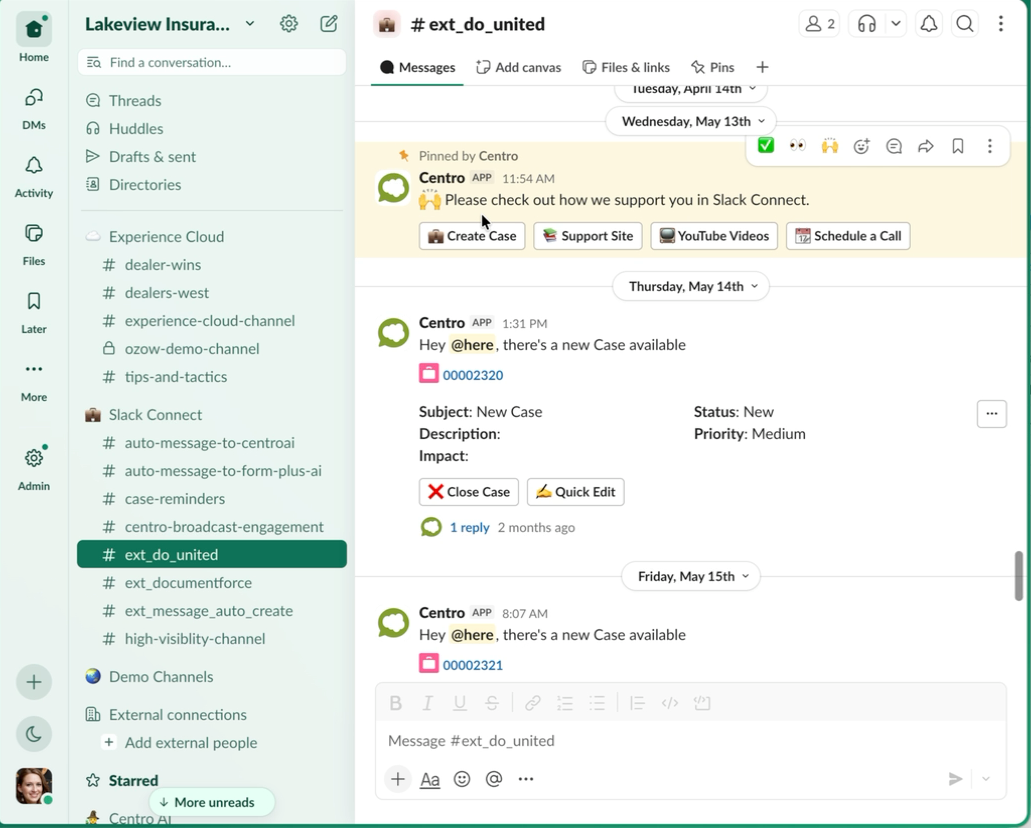
Slack Connect channel where Centro posts a new Salesforce Case card with status and priority, plus Close Case and Quick Edit buttons, below a pinned Centro support message.

A Case created from a customer message in a Slack Connect channel.
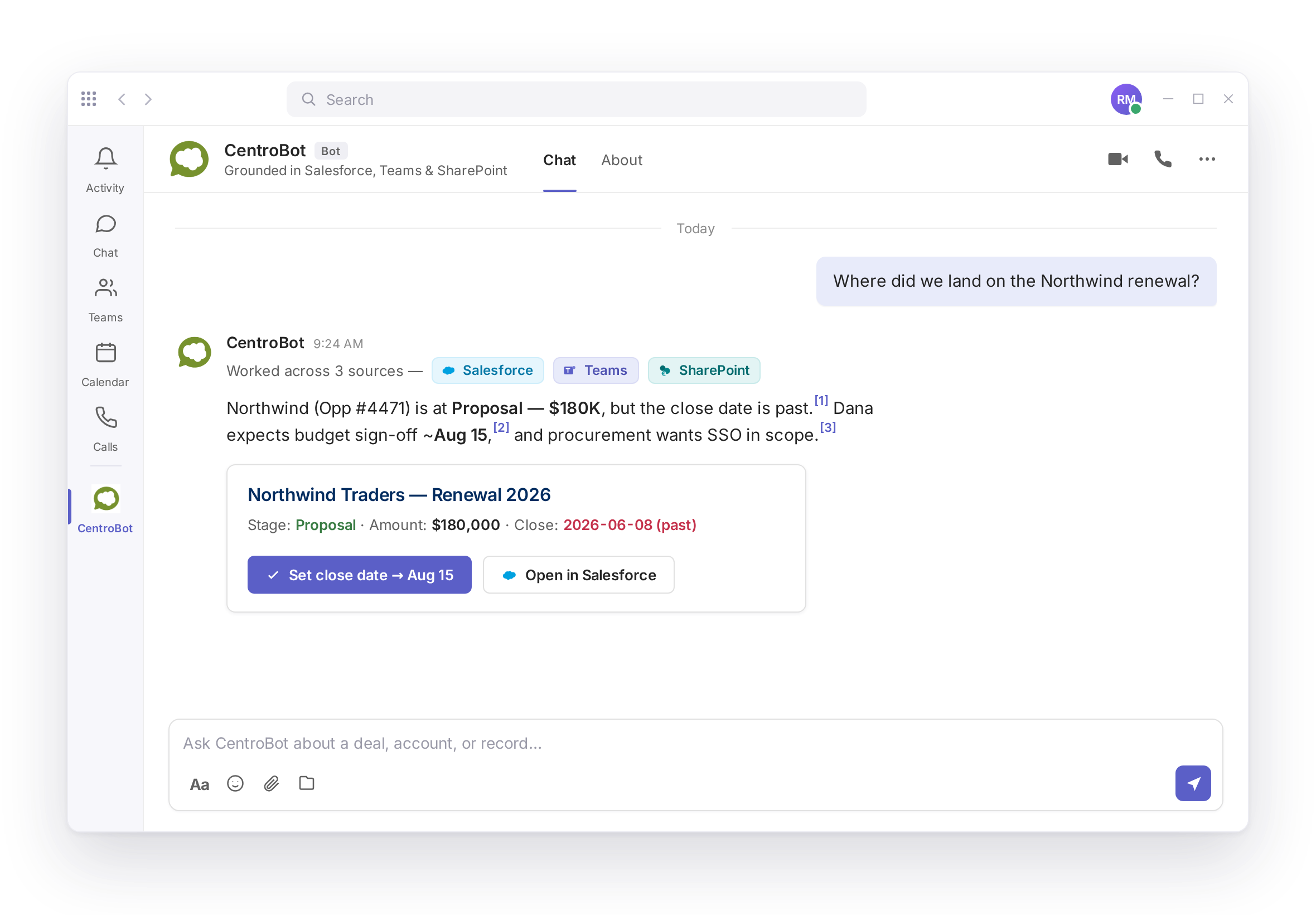
Answers with sources, for licensed agents

  • CentroBot answers questions from Salesforce, SharePoint, and Teams with a citation on every answer.
  • Action Prompts message the agent first when a Case needs attention.
  • Every create or update asks for approval before it writes.
CentroBot in Microsoft Teams answering a question about a customer renewal, with numbered citations to Salesforce, Teams, and SharePoint sources and a Salesforce record card with Set close date and Open in Salesforce buttons.

Built for Service Cloud admins

  • Configured in Salesforce with Flow
  • Different fields per record type
  • Salesforce permissions always apply
  • Teams users work Cases without a Salesforce license
  • Installs from AppExchange and Microsoft Marketplace
SOC 2 Type II, audited annually by A-LIGN. No shadow data store.
Security details

Frequently asked questions

Can I create a Salesforce Case from Microsoft Teams?

Yes. Use a message shortcut or a Centro Form to turn a Teams message into a Case. Files and context carry over to the record.

Yes. The same shortcut and Centro Forms work in Slack. The Case is created in your Salesforce org with the message attached.

No. Teams users can create, update, and resolve Cases without a Salesforce license. Salesforce permissions still apply.

Yes. Centro works in Slack Connect and Teams shared channels, so external customers can raise issues where they already talk to you.

No. Centro keeps no shadow data store. Records stay in your Salesforce org.

Plans and prices are listed on the pricing page.

See it on your own Cases