




Our office:
1495 Canyon Blvd
Suite 107
Boulder, CO 80302
info@centro.rocks
Beyond the out-of-the-box solution.
The out-of-the-box integration handles one-time actions: create a channel, post a message. Repeatable automation at scale means building and maintaining it yourself. Centro is the no-code productized version of that build. Fully automate your most critical workflows, consistently and reliably, at scale: full channel management lifecycle, two-way automation, and any number of conversations linked to any record. For the AI agent comparison, see CentroBot vs Slackbot.
Automation
Automatically trigger workflows through Slack including creating or updating channels, posting messages or threads, custom buttons, and custom platform events. Beyond data updates, Centro supports true two-way workflow automation between Slack and Salesforce.
Auditing
A Salesforce object that logs every message Centro sends, with status, error code, and message timestamp. Report on it like any object. Select rows and resend.
Conversations
Link a channel, thread, DM, or single message from Slack, the record page, or Flow, beyond the 1:1 channel-to-record model out of the box. The linked conversation shows on the record page. Reply from Salesforce.
Out of the box means the Salesforce App for Slack, Salesforce channels, and the Slack actions in Salesforce Flow. The out-of-the-box integration is one-way, Salesforce to Slack: a user can edit a record from Slack by hand, but nothing in Slack can trigger Salesforce automation. Platform events are standard Salesforce events your Flows can subscribe to, the same mechanism admins already use for other integrations.
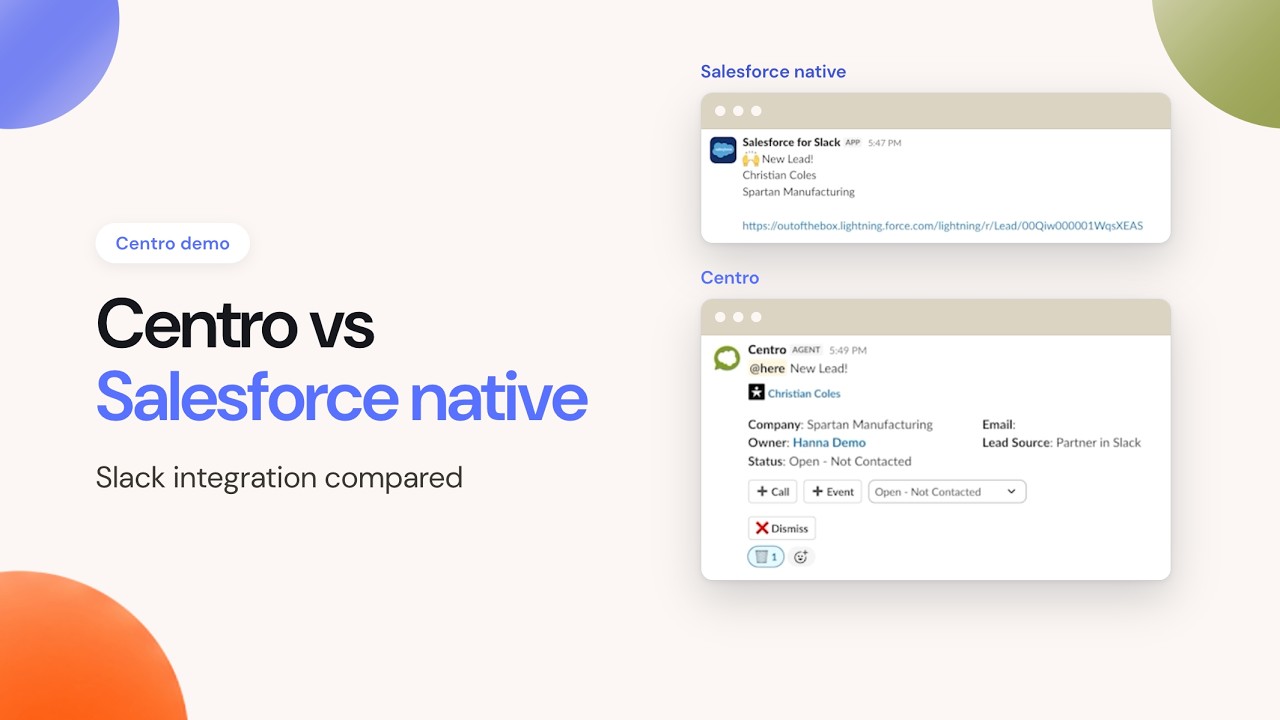
The difference is what the action knows about. One sends text. One sends your data model.
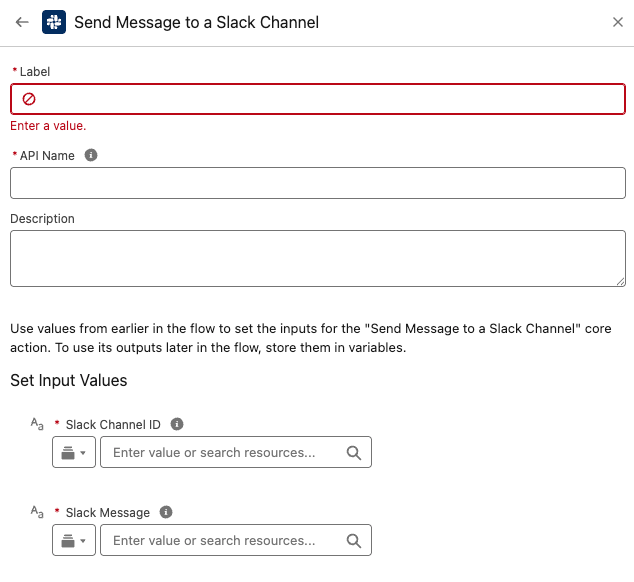
Out of the box: compose text, manage timestamps yourself.
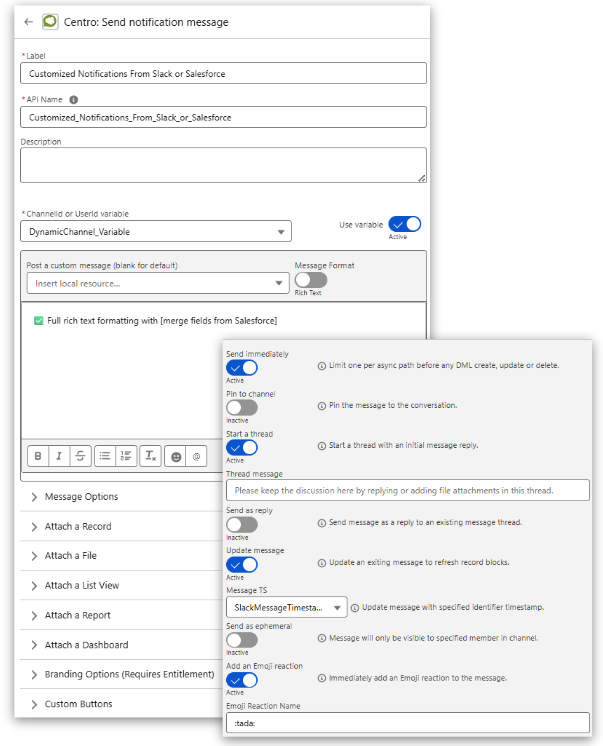
Centro: the record, the destination, and what happens next.
The out-of-the-box actions post a message. Threading and edits require a custom timestamp field you build and maintain.
Centro's Flow elements post to a channel, reply in an existing thread, update a sent message in place, send ephemeral messages visible to one user, and send synchronously so the Flow can branch on the result. All from standard Flow screens. No Apex, no Block Kit JSON.
Every automated send creates a Message Queue record, a Salesforce object that logs every message Centro sends, with delivery status, error code, and message timestamp. Build reports and dashboards on it like any other object.
When sends fail, filter to the failed rows, select them, and click Resend. The out-of-the-box actions return a timestamp you must store and manage yourself.
Linked channels put Salesforce into Slack; message and reaction events bring Slack back into Salesforce. Link a channel, a thread, or a single message to any record from Slack, the record page, or Flow. Linked channels show on the record page, and you can reply from Salesforce.
Salesforce channels link a channel to a record. Centro also links individual threads and single messages, so the specific conversation about a deal or case stays with the record.
Replacing Chatter
Teams sunsetting Chatter use linked threads as the record's conversation feed. The discussion happens in Slack and stays visible on the record.
Keep them. Centro adds what they do not cover: a send log you can report on and resend from, threads and single messages linked to records, external partner channels, and users without a Salesforce seat. Centro is priced from $15/user/month, non-Salesforce users from $4. The out-of-the-box integration is included with supporting licenses; Sales Elevate is sold separately.
No. Centro links the channels you already have, and adds threads, single messages, DMs, Slack Connect channels, and users without a Salesforce license.
No. Centro's elements drop into your existing Flows alongside what is already there. Replace a Send Slack Message action where you need threading, updates, or logging, and leave the rest alone. No Apex is required.
Yes. Centro is SOC 2 Type II attested since 2022, stores no message content or record data, and delivers through the native Slack message paths, so your existing archiving and supervision tools capture everything. Details are on the Security page.