
Alternatives to the Native Salesforce Teams Integration: The 2026 Decision Guide
Salesforce ships a free Microsoft Teams app. For some teams it is all they need. For others it runs out of road in the first month. This guide lays out the three categories of Salesforce-Teams integration, what each one is actually for, and how to pick, including when the honest answer is to keep the native app and spend nothing.
Last updated: August 2026.
The three categories
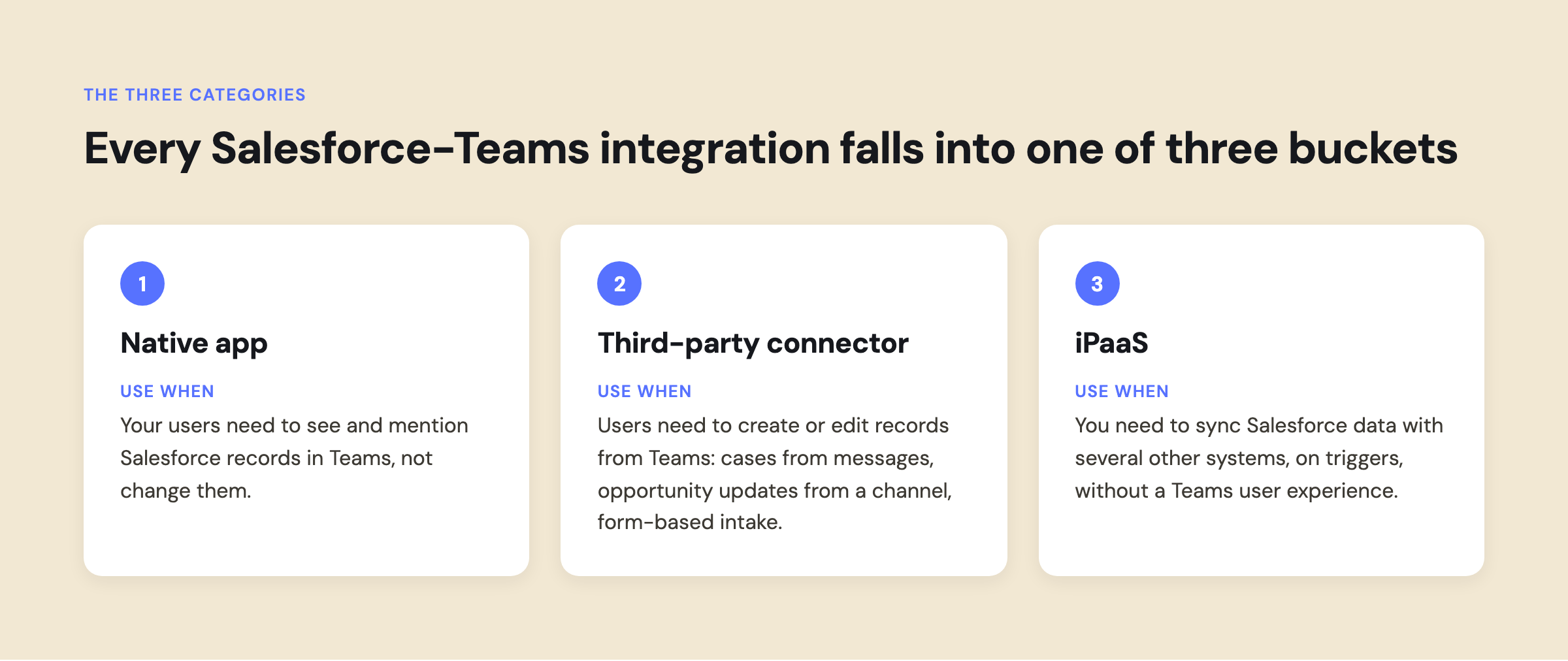
Every Salesforce-Teams integration on the market falls into one of three buckets:
1. The native integration. The free Salesforce for Microsoft Teams app, built by Salesforce, installed from AppSource. Mention Salesforce records in Teams chats, preview record details, pin records to channel tabs, and receive some notifications.
2. Third-party connectors. Purpose-built products that live inside Teams and Salesforce and go deeper than the native app: two-way sync, record creation and editing from Teams, automation, approvals, and richer interfaces. Centro is in this category, alongside tools like Cyfuno Labs' Flow-based connector.
3. iPaaS and middleware. General-purpose integration platforms (Zapier, Make, Workato, MuleSoft, Boomi, Power Automate) that connect Salesforce and Teams as two nodes among hundreds. Strong for data pipelines and cross-system automation. Not built for humans working inside Teams.
The category question settles most evaluations before any product comparison does. A team that needs lead notifications in a channel has a different problem than a team that needs reps updating opportunities without leaving Teams, and both differ from an ops team syncing data across five systems.
When the native integration is enough
Use the free Salesforce app for Teams and stop there if all of the following are true:
- Your users need to see and mention Salesforce records in Teams, not change them
- Notifications matter more than actions
- Everyone who touches Salesforce data in Teams has a Salesforce license
- Nobody is asking for approvals, forms, or record creation from chat
That describes plenty of teams. The native app is free, maintained by Salesforce, and covered by Salesforce support. Deploying a paid connector to do what the native app already does is wasted spend.
One prerequisite check: the native app requires Sales or Service Cloud on Enterprise edition or higher. Professional edition orgs cannot use it, which moves them straight to the connector or iPaaS decision.
When you have outgrown it
The signals that push teams past the native app are consistent:
- Users need to create or edit records from Teams: cases from messages, opportunity updates from a channel, form-based intake
- You want automation: Salesforce Flow or events driving messages, channels, or actions in Teams
- Non-Salesforce-licensed users need to interact with Salesforce data (frontline staff, external partners, execs who will never log in)
- You need approvals, swarming, or structured workflows in the flow of conversation
- Notification volume and targeting need real configuration, not defaults
If two or more of those describe you, you are choosing between a third-party connector and an iPaaS.
Salesforce Channels, but for Microsoft Teams
Salesforce built Salesforce Channels for Slack: record-centric channels where a list of CRM data lives inside the conversation. There is no Microsoft Teams equivalent from Salesforce, and this is a capability gap the native app does not address.
Centro closes it. Add a Salesforce List to any Teams channel and the team can view, filter, and edit that list of records directly in Teams: a pipeline list in the sales channel, an open-case list in the support channel, a renewal list in the CS channel. Edits write back to Salesforce with the editing user's own permissions, so the list is live data, not a snapshot. For teams that saw Salesforce Channels in Slack and wanted the same working pattern in Teams, this is the closest equivalent available.
Comparison: the seven tools teams actually evaluate
How to read that table
The iPaaS rows are not worse products. They solve a different problem. An iPaaS moves data between systems on triggers. A connector puts working interfaces in front of people inside Teams. The recurring evaluation mistake is asking an iPaaS to produce a user experience, or asking a connector to be a data pipeline.
There is also a licensing dimension that gets missed in feature comparisons. With the native app and most iPaaS patterns, a human acting on Salesforce data needs a Salesforce license. Centro's governed automation user model lets non-licensed users interact through Teams with admin-defined guardrails, which changes the economics for support teams, frontline staff, and external collaborators.
If your goal is X, use Y
- See Salesforce records in Teams conversations: the native app. Free, done.
- Get notified in a channel when a record changes: native app if defaults suffice; Power Automate if you are Microsoft-licensed and comfortable maintaining flows; Centro if you want targeting, formatting, and Flow-driven logic without flow maintenance.
- Create and update Salesforce records from Teams: a third-party connector. This is the line the native app does not cross.
- Work a shared list of records in a channel (pipeline, cases, renewals): Centro's Salesforce Lists in Teams channels, the closest thing to Salesforce Channels for Teams.
- Run approvals, case swarming, or intake forms in Teams: Centro.
- Let non-Salesforce-licensed users work with Salesforce data: Centro's automation user model.
- Sync Salesforce data with several other systems: an iPaaS. Zapier or Make for simple, Workato or MuleSoft or Boomi at enterprise scale.
- Bring Agentforce AI agents into Teams: Centro's Agentforce for Microsoft Teams.
- Do all of it with one tool: no single tool does. Common enterprise pattern: an iPaaS for pipelines plus a connector for the human layer.
FAQ
Is there an alternative to the native Salesforce Teams integration?
Yes, two categories: third-party connectors like Centro that add record creation, editing, automation, and AI inside Teams, and iPaaS platforms like Power Automate, Zapier, and Workato for system-to-system automation.
Is the native Salesforce integration for Microsoft Teams free?
Yes. The Salesforce for Microsoft Teams app is free on AppSource. Users need Salesforce licenses to use it.
Can you create Salesforce records from Microsoft Teams?
Not with the native app. Third-party connectors add this; Centro supports record creation and editing from chats, channels, forms, and message actions.
Is there a Microsoft Teams version of Salesforce Channels?
Not from Salesforce; Salesforce Channels is a Slack feature. Centro provides the equivalent working pattern in Teams: Salesforce Lists pinned to channels that users can view, filter, and edit, with changes written back to Salesforce under each user's own permissions.
Is Power Automate good enough for Salesforce and Teams?
For notification-style automation in a Microsoft-licensed shop, often yes. The Salesforce connector requires premium licensing, and interactive experiences (editing records, approvals, forms in Teams) are outside its lane.
What is the most secure way to connect Salesforce and Microsoft Teams?
Whichever tool respects your existing permission model. Centro runs every API call with the individual user's own permissions via per-user OAuth and is SOC 2 Type 2 audited; details on the Centro security page.

